SPE-420 SNMPv3 Trap Configuration

Subject: Encoder Sending SNMPv2c Traps Instead of SNMPv3 - Configuration Issue
Hello Hanwha Community,
I'm reaching out regarding an issue I'm experiencing with one of our Hanwha encoders and SNMP trap configuration.
**Issue Summary:**
We have configured our encoder to send SNMP v3 traps to our monitoring system, but despite the configuration settings indicating SNMPv3, the encoder is consistently sending SNMPv2c traps instead.
**Current Situation:**
- Encoder model: SPE-420
-Version Information
===================
Build number: 2.11.03_20220426_R142
SUNAPI: 2.5.9
ONVIF: 20.6
UWA: 2.8.0_220422
===================
- Configuration: SNMPv3 trap settings have been properly configured in the web interface and HTTPS is selected and password is set.
- Expected behavior: Encoder should send SNMPv3 traps with authentication and privacy
- Actual behavior: Encoder is sending SNMPv2c traps (confirmed via packet capture/monitoring system logs)
**What We've Tried:**
- Verified SNMPv3 configuration settings multiple times
- Rebooted the encoder
- Checked that SNMPv3 credentials (username, auth protocol, privacy protocol) are correctly entered
- Confirmed the destination IP and port are correct
**Questions:**
1. Is there a known issue with SNMPv3 trap functionality on this encoder model/firmware version?
2. Are there any additional configuration steps required to enable SNMPv3 traps beyond the standard SNMP settings?
3. Could there be a firmware limitation that defaults to SNMPv2c for traps even when SNMPv3 is configured?
4. Has anyone else experienced this issue and found a workaround or solution?
Any guidance or suggestions would be greatly appreciated. I'm happy to provide additional configuration details or logs if needed.
Thank you in advance for your assistance.
Best regards,
-
Official comment

Hi Tugral,
Thank you for your request.
As far as I know there is no internal information regarding any issues with SNMPv3 on the SPE-420.
I also noticed that the firmware version on the device is about three years old and since then there have been a few updates if you would like to try that and see how you get on.
Here are the links to two newer firmware versions.
https://update.hanwha-security.com/FW/Encoder/SPE420/SPE-420_2.21.01_20230707_R150.zip
https://update.hanwha-security.com/FW/Encoder/SPE420/SPE-420_2.21.02_20230803_R152.zip
Give that a go and let us know how you get on.
-
Thank you for your response regarding the SNMPv3 trap issue on the SPE-420 encoder.
FIRMWARE UPDATE COMPLETED
==========================
- Updated to: 2.21.02_20230803_R152 (latest version)
- Factory reset performed
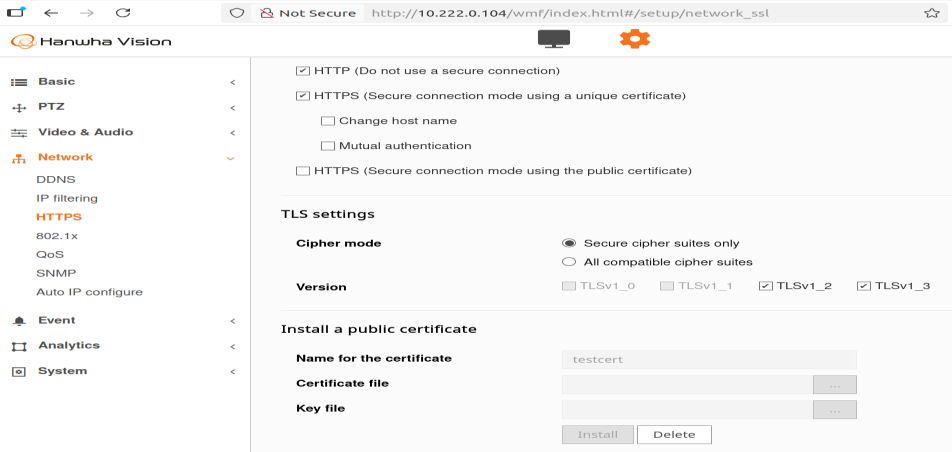
- SSL/TLS certificate installed (testcert) and HTTPS enabledISSUE PERSISTS
==============
Despite SNMPv3 being enabled with certificate installed, the encoder continues to send SNMPv2c traps.**Evidence:**
1. API Query shows: `Version3=True` but `UserPassword=` (EMPTY!)
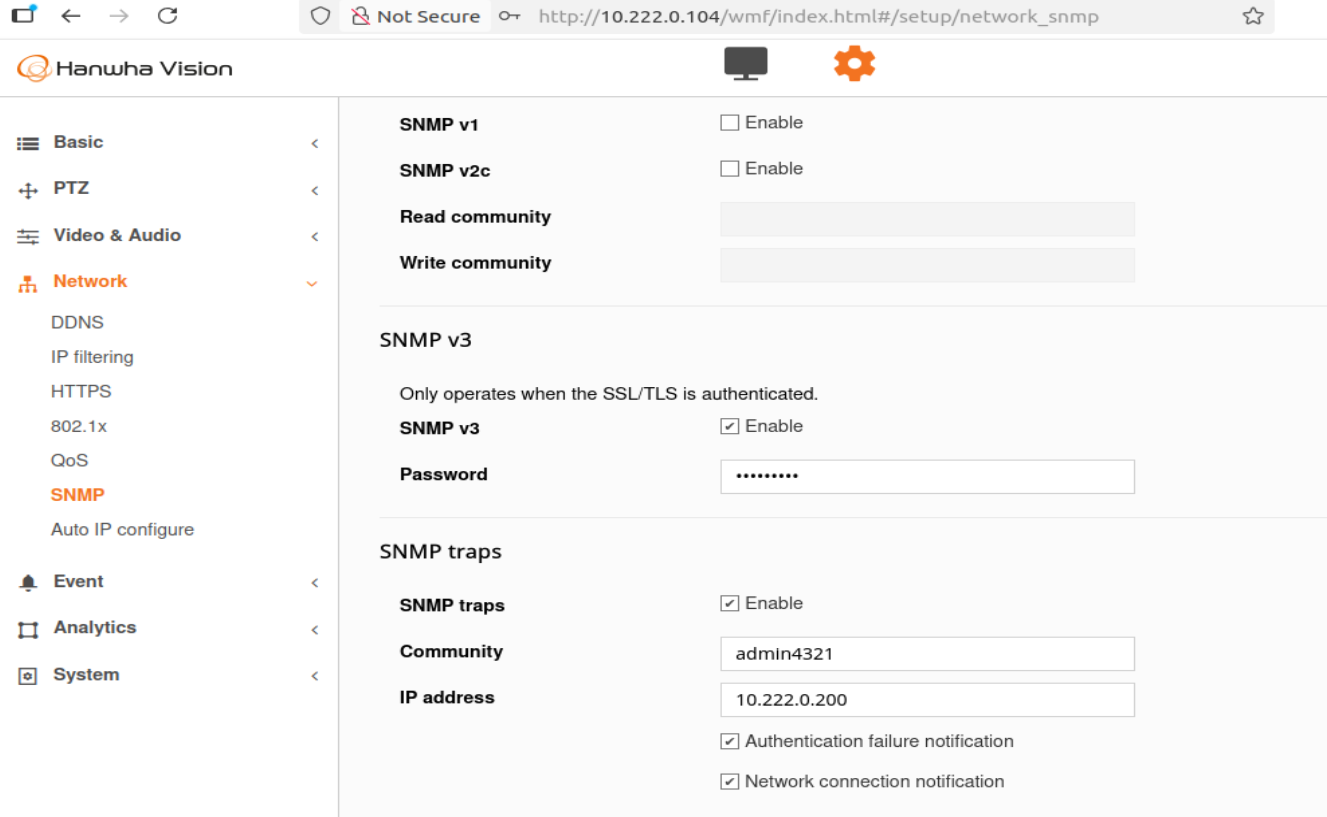
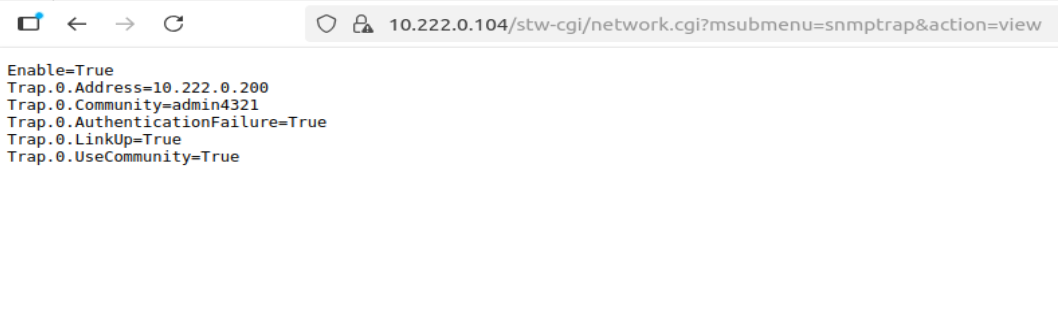
2. Trap config shows: `Community=admin4321` (SNMPv2c field)
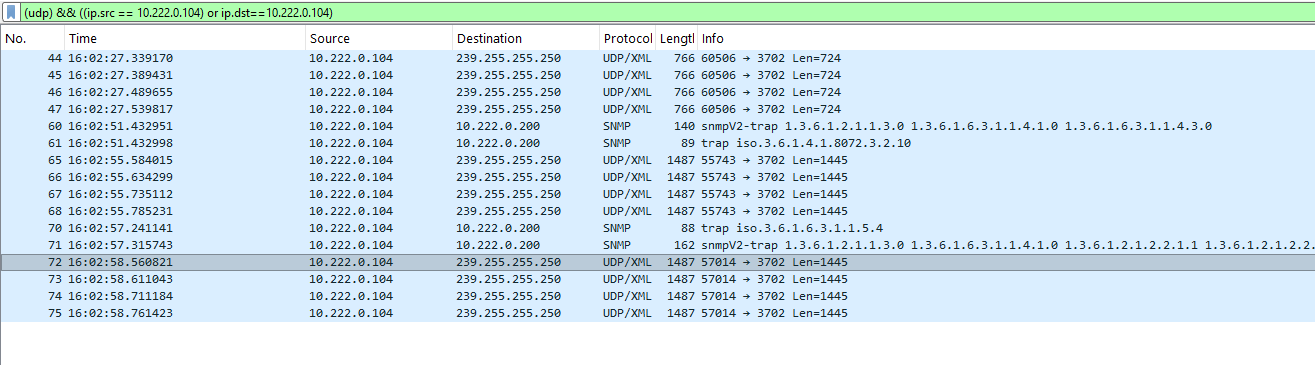
3. Wireshark capture confirms: Packets labeled "snmpv2-trap", NOT "SNMPv3"
4. SNMPv3 query tests: All authentication methods fail with "Authentication failure"QUESTIONS
=========**1. Does the SPE-420 support SNMPv3 for TRAP transmission?**
- Web UI implies SNMPv3 traps when both SNMPv3 and traps are enabled
- Trap configuration only shows "Community" field (SNMPv2c)
- No fields for SNMPv3 trap credentials (username, auth protocol, priv protocol)**2. Is the current behavior by design?**
- SNMPv3 for queries (GET/SET) + SNMPv2c for traps only?**3. Why is UserPassword empty in API response?**
- Password entered via web UI but API shows: `UserPassword=`
- Is this a known issue after firmware updates?
- SNMPv3 query tests all fail with "Authentication failure"**4. If SNMPv3 traps ARE supported, what's missing?**
- How do we configure SNMPv3 trap credentials?
- Are there hidden API parameters not in web UI?SCREENSHOTS ATTACHED
====================
1. snmp_settings_query.png - Shows Version3=True, UserPassword EMPTY
2. snmptrap_settings_query.png - Shows trap config with Community field only
3. snmp_v3_trap.png - Web UI showing SNMPv3 enabled
4. tls_cert.png - Certificate installation
5. wireshark.png - SNMPv2c traps capturedDevice: SPE-420 (10.222.0.104)
Firmware: 2.21.02_20230803_R152
Trap destination: 10.222.0.200:162Thank you,
Tugrul G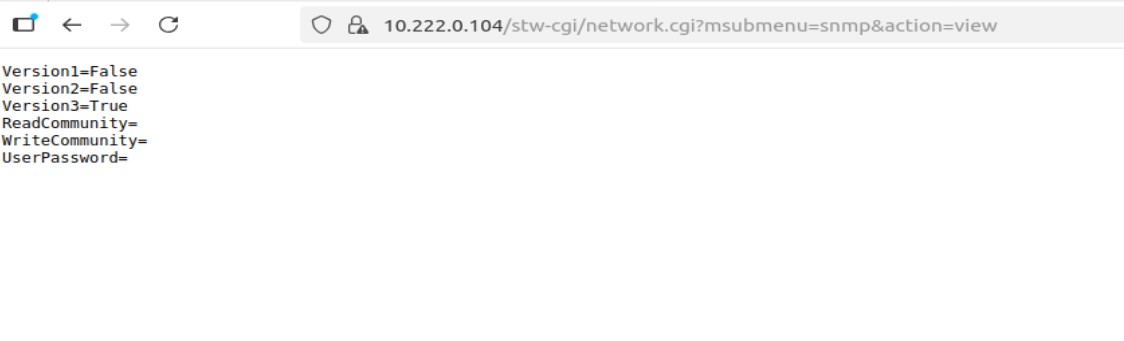
Best regards,
Tugrul G0 -
Hello Hanwha Vision Support Team,
I'm following up on my post from 6 days ago regarding SNMPv3 trap configuration on the SPE-420.
Core Question:
Does the SPE-420 encoder support SNMPv3 for trap transmission, or only SNMPv2c traps?Current Situation:
- Firmware: 2.21.02 (latest, as recommended)
- SNMPv3 enabled with certificate installed
- Device sends SNMPv2c traps (confirmed via Wireshark)
- Trap config only shows "Community" field (no SNMPv3 credentials)
- API shows: Version3=True but UserPassword= (empty)What We Need:
1. SNMPv3 traps supported → What's the correct configuration?
2. Only SNMPv2c traps supported → We need to plan accordinglyThis is blocking our deployment due to security requirements for encrypted trap transmission.
Screenshots and detailed testing in my previous post above. Happy to provide additional info.
Thanks,
Tugrul G0 -
Hi Tugrul,
Thank you for the detailed information.
I have escalated this to our engineers and are waiting a response regarding your request.
As per the manual SNMP v3 is supported as well as earlier versions
During that time and some reading on my side I did notice that when setting the SNMP traps for v3 is only for HTTPS only and that a minimum of 8 characters and up to 16 characters are utilized for the SNMP trap authentication.
Once I have more information from HQ I will certainly let you know however we can create this as a support ticket if that suits you if you can advise.
0 -
Hi Tugrul,
After some internal investigation and testing we can also confirm that the device that you mentioned does not support SNMP v3 transmission and only SNMP v2.
I have advised the developers that this is something that is required as per your request and they are considering it, however kindly note that this is something that will take some time before it's officially supported.
0
Please sign in to leave a comment.
Comments
5 comments